Inventory and offhand: equip your kit before PvP
Learn the Unstable SMP FFA inventory, hotbar and offhand workflow with real kit screenshots and the E, F, Q and number-key controls.
Read the equipment preview
The character selection panel shows armour and hotbar items separately. FlameFrags’ preview below includes several weapon options alongside a shield, cobwebs, golden apples and pearls. Use the icons to plan your first engagement before entering the arena.
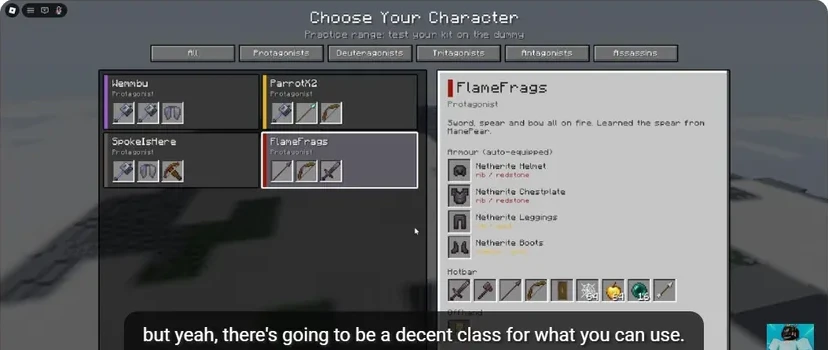
- The selected character determines the equipment preview.
- Armour appears separately from usable hotbar items.
- Locate the weapon, shield, cobweb, apple and pearl slots.
Do not assume a character carries every item named in the game’s description. The preview for your selected kit is the useful starting point. Compare it with the Wraith example if you want to see how a different loadout changes the approach.
Select, swap, check
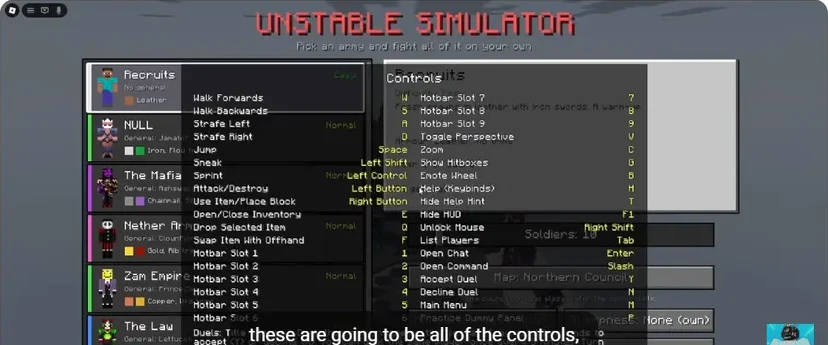
- Press E to inspect inventory.
- Close inventory and use 1–9 to select the hotbar item you need.
- Select the item intended for the offhand.
- Press F to swap it with the current offhand item.
- Look at both hands, then reselect your main weapon.
The game help explicitly labels F as “Swap Item With Offhand.” It is a swap, so the item already in that hand returns to the selected slot. Repeating F reverses the exchange. Q is Drop Selected Item, so keep those two actions distinct.
Give each item a job
| Job | Examples shown in the tutorials | Habit to build |
|---|---|---|
| Attack | Sword, axe, bow, mace | Return to the weapon after utility use |
| Protection | Shield, Totem | Check the offhand before engaging |
| Recovery | Golden apple, potions | Use them while you have room |
| Positioning | Pearl, rocket with Elytra | Pick a destination before committing |
| Control | Cobwebs | Aim at the route the opponent is using |
These are equipment roles, not instructions to put every item into a single kit. Keep the arrangement you can use consistently. Learn healing timing and pearl escape separately.
Rehearse the complete sequence
In Practice Dummy, attack once, select a utility item, use it, and return to the weapon. Then repeat the sequence while moving. A successful drill ends with the correct weapon selected; stopping after the utility action leaves you unprepared for the next hit.
For the Elytra mace sequence, equipment changes are part of the attack itself. Practise the chestplate swap before adding height. A shield or totem in the wrong hand is a setup mistake you can catch before entering Duels.
Sources
Checked 2026-11-13 · sources below
Game identity and mode limits: official Roblox experience. Screenshots link directly to the creator and the displayed video moment. Step sequences and practice drills are written by the wiki editors.
Related videos

Related Articles
guides
Character guide: read kits, compare Wraith and FlameFrags
Compare real Wraith and FlameFrags loadout panels in Unstable SMP FFA, then choose a character around the weapons and movement you want to learn.
guides
Cobweb guide: trap opponents and escape with pearls
See how cobwebs affect Unstable SMP FFA fights, where to place pressure and how to choose a clear Ender Pearl escape destination.
guides
Sword combat guide: critical hits, strafing and W-taps
Practise Unstable SMP FFA sword timing, descending critical hits, strafing and sprint resets with annotated dummy screenshots and video references.
Was this helpful?
Thanks for the feedback!