Character guide: read kits, compare Wraith and FlameFrags
Compare real Wraith and FlameFrags loadout panels in Unstable SMP FFA, then choose a character around the weapons and movement you want to learn.
Use the preview as your starting point
The official Roblox listing advertises 28 characters. The character menu groups them under Protagonists, Deuteragonists, Tritagonists, Antagonists and Assassins. Those groups help you browse; the equipment panel tells you how a kit actually plays.
Wraith: movement and equipment visibility
The Wraith panel describes a Riptide trident, mace, Elytra and TNT carts. It also describes permanent invisibility with visible armour and the item in hand. That last detail matters: carrying equipment still gives an opponent something to track.
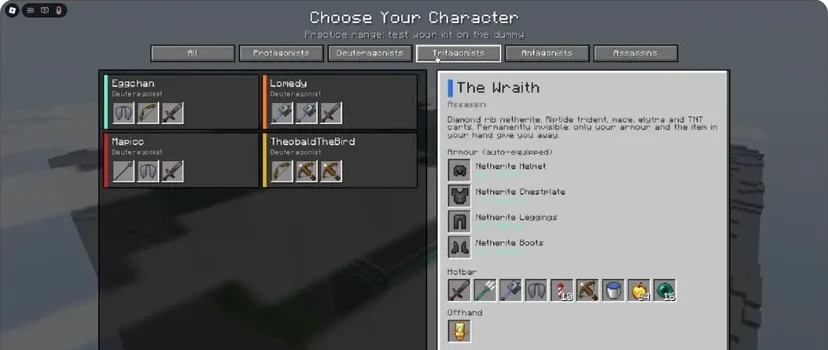
- Read the character's equipment and ability description.
- Armour is listed separately from the hotbar.
If you want to learn this movement toolkit, begin with the Elytra mace drill. Practise one tool at a time. Carrying several movement options does not make the sequence automatic.
FlameFrags: inspect the complete hotbar
The FlameFrags description highlights a sword, spear and bow with a fire theme. Its pictured hotbar also shows an axe, shield, cobwebs, golden apples and pearls. That gives you multiple jobs to assign before entering combat.
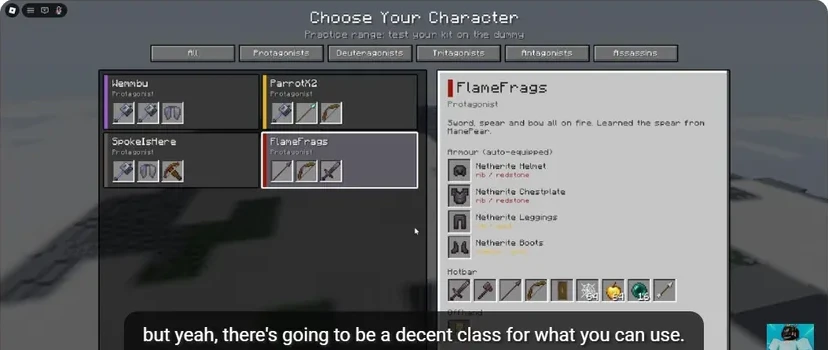
- The selected character determines the equipment preview.
- Armour appears separately from usable hotbar items.
- Locate the weapon, shield, cobweb, apple and pearl slots.
Use the sword for the basic combat routine. Learn a separate utility transition, such as web → weapon or pearl → recovery, before adding another weapon to the sequence.
Choose by the next skill you want
| Your goal | What to look for in the preview |
|---|---|
| Learn sword timing | A familiar melee weapon |
| Practise projectile tracking | A bow or another ranged option |
| Learn aerial attacks | Elytra, rocket and mace equipment |
| Work on control and escape | Cobwebs and pearls |
| Improve recovery | Healing supplies you can select quickly |
Compare kits without changing everything
Pick one drill, perform it with the first character, then inspect what changes with the second. Focus on equipment access and input comfort. Radex Tips recommends an Assassin in his beginner video, but that is his recommendation; it does not establish a universal character tier list.
Unlocks and purchases belong to the live character menu. Read that panel before spending currency. For the first session, use an available kit and take it through Practice and Duels.
Sources
Checked 2026-11-13 · sources below
Game identity and mode limits: official Roblox experience. Screenshots link directly to the creator and the displayed video moment. Step sequences and practice drills are written by the wiki editors.
Related videos


Related Articles
guides
Cobweb guide: trap opponents and escape with pearls
See how cobwebs affect Unstable SMP FFA fights, where to place pressure and how to choose a clear Ender Pearl escape destination.
guides
Sword combat guide: critical hits, strafing and W-taps
Practise Unstable SMP FFA sword timing, descending critical hits, strafing and sprint resets with annotated dummy screenshots and video references.
guides
Unstable SMP FFA controls: keyboard and combat keys
A visual PC controls reference for Unstable SMP FFA: movement, attack, inventory, offhand, duel requests, practice and the help overlay.
Was this helpful?
Thanks for the feedback!