Healing guide: golden apples, potions and safe resets
Prepare golden apples and combat potions in Unstable SMP FFA, then create space to recover instead of opening inventory during a sword exchange.
Prepare the kit before the fight
Find your golden apples and potions while you are safe. Hyunn discusses Strength, Swiftness and Fire Resistance at 2:05–3:04; Radex Tips covers apples and combat potions at 1:33–1:50. Read the selected kit rather than assuming every character has the same supplies.
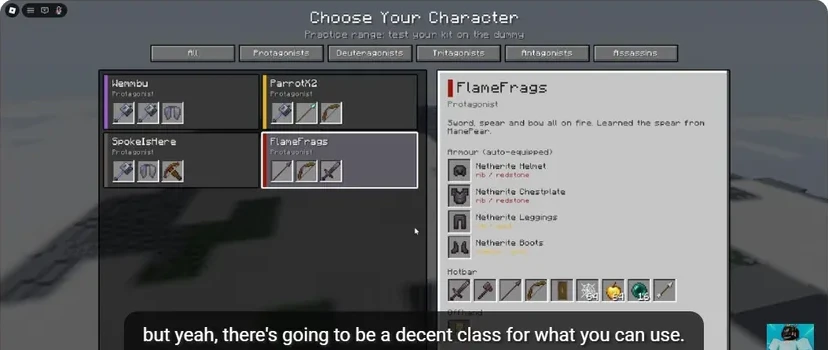
- The selected character determines the equipment preview.
- Armour appears separately from usable hotbar items.
- Locate the weapon, shield, cobweb, apple and pearl slots.
| Item | Role in the tutorial | When to prepare it |
|---|---|---|
| Golden apple | Pre-fight preparation and recovery | Before committing or after creating space |
| Strength potion | Attack preparation | Before entering the exchange |
| Swiftness potion | Movement preparation | Before chasing or repositioning |
| Fire Resistance potion | Protection against fire | Before fighting through fire pressure |
| Shield / Totem | Defensive equipment | Check the appropriate hand before engaging |
Use the item’s current in-game display for its effect and duration. This guide focuses on the order of actions rather than importing potion numbers from Minecraft.
Use a recovery sequence
- Break the exchange. Move out of immediate sword pressure.
- Choose the route. Look for clear ground and a place to turn.
- Select and use the item. Complete the action while watching the opponent.
- Return to your weapon. Confirm the correct slot is selected.
- Reassess the fight. Re-enter when your position is under control.
ItzVexo uses a golden apple after health drops at 4:22. The important habit is recognising the recovery window before committing to another attack.

- Watch the floor for webs before pushing forward.
- Locate the opponent again after changing position.
Escape tools buy room
An Ender Pearl changes position; it does not replace the healing action. Choose a clear landing point, teleport out, then recover. The cobweb escape guide shows why destination choice matters when a web slows the approach.
Avoid opening inventory while an opponent is already landing hits. Arrange the hotbar and offhand first so the recovery sequence requires a familiar selection rather than a search.
Practise a reset, not just an attack
In Practice Dummy, alternate between an attack and a utility selection. Then take the sequence into Duels and look for a real recovery window. In FFA, look beyond the player you just escaped: a second opponent can occupy the space behind you.
A common failure is successfully healing and then continuing to hold the apple during the next exchange. Make weapon selection the last deliberate step of every reset.
Sources
Checked 2026-11-13 · sources below
Game identity and mode limits: official Roblox experience. Screenshots link directly to the creator and the displayed video moment. Step sequences and practice drills are written by the wiki editors.
Related videos


Related Articles
guides
Character guide: read kits, compare Wraith and FlameFrags
Compare real Wraith and FlameFrags loadout panels in Unstable SMP FFA, then choose a character around the weapons and movement you want to learn.
guides
Cobweb guide: trap opponents and escape with pearls
See how cobwebs affect Unstable SMP FFA fights, where to place pressure and how to choose a clear Ender Pearl escape destination.
guides
Sword combat guide: critical hits, strafing and W-taps
Practise Unstable SMP FFA sword timing, descending critical hits, strafing and sprint resets with annotated dummy screenshots and video references.
Was this helpful?
Thanks for the feedback!