Unstable SMP FFA controls: keyboard and combat keys
A visual PC controls reference for Unstable SMP FFA: movement, attack, inventory, offhand, duel requests, practice and the help overlay.
Open the controls overlay
Press H to open the in-game help. ItzVexo opens this overlay while viewing the Simulator selection screen. The screenshot provides the reference for the PC bindings below.
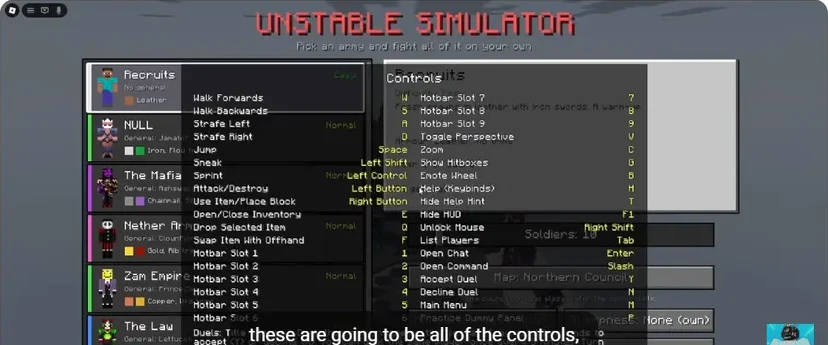
Movement and view
| Action | PC key |
|---|---|
| Move forward / backward | W / S |
| Strafe left / right | A / D |
| Jump | Space |
| Sneak | Left Shift |
| Sprint | Left Control |
| Toggle perspective | V |
| Zoom | C |
| Show hitboxes | G |
Practise movement while tracking the dummy. Keep your crosshair on the target as you move left and right; that is more useful than increasing sensitivity until the view becomes hard to control.
Combat and inventory
| Action | PC key |
|---|---|
| Attack / destroy | Left mouse button |
| Use item / place block | Right mouse button |
| Open / close inventory | E |
| Swap selected item with offhand | F |
| Drop selected item | Q |
| Select hotbar slot | 1–9 |
F swaps items; Q drops them. Learn that distinction before holding a valuable combat tool near an edge. Use the offhand guide to practise the swap with a shield or totem.
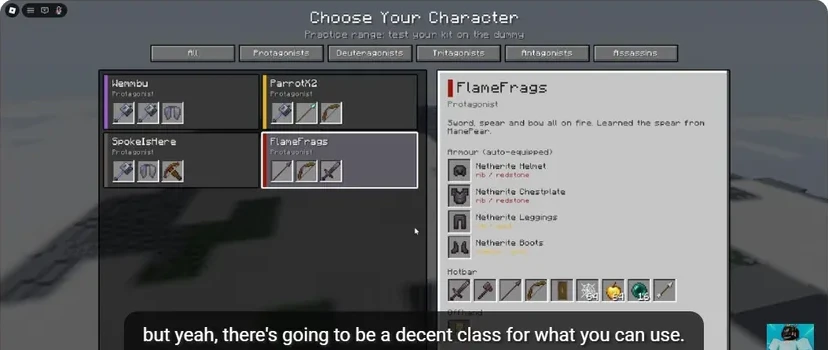
- The selected character determines the equipment preview.
- Armour appears separately from usable hotbar items.
- Locate the weapon, shield, cobweb, apple and pearl slots.
Menus and social controls
| Action | PC key |
|---|---|
| Main menu | M |
| Practice Dummy panel | P |
| Accept / decline duel | Y / N |
| List players | Tab |
| Open chat / command | Enter / Slash |
| Emote wheel | B |
| Hide HUD | F1 |
| Unlock mouse | Right Shift |
| Hide help hint | T |
The developer advertises rebindable input and support for PC, mobile and controller. If you change a binding, use your in-game setting as the working reference. On mobile, use the visible attack, use and jump buttons rather than translating PC keys into screen locations.
A quick controls drill
- Enter Practice Dummy from the mode menu.
- Select your weapon with its hotbar number.
- Open E, inspect the items, then close it.
- Select an offhand item and press F; check which item is now visible in each hand.
- Return to the weapon, move with A/D and land one deliberate hit.
- Press H whenever you need the complete reference.
Once this feels natural, use the same layout in a duel.
Sources
Checked 2026-11-13 · sources below
Game identity and mode limits: official Roblox experience. Screenshots link directly to the creator and the displayed video moment. Step sequences and practice drills are written by the wiki editors.
Related videos

Related Articles
guides
Character guide: read kits, compare Wraith and FlameFrags
Compare real Wraith and FlameFrags loadout panels in Unstable SMP FFA, then choose a character around the weapons and movement you want to learn.
guides
Cobweb guide: trap opponents and escape with pearls
See how cobwebs affect Unstable SMP FFA fights, where to place pressure and how to choose a clear Ender Pearl escape destination.
guides
Sword combat guide: critical hits, strafing and W-taps
Practise Unstable SMP FFA sword timing, descending critical hits, strafing and sprint resets with annotated dummy screenshots and video references.
Was this helpful?
Thanks for the feedback!