Unstable SMP FFA beginner guide: your first fights
Start Unstable SMP FFA with illustrated steps for choosing a kit, using Practice Dummy, preparing items and moving into Duels or FFA.
1. Start in Practice Dummy
The main menu separates four activities. Choose Practice Dummy for your first session: a stationary target gives you room to find your controls and see what your equipment does. Save the army battles and crowded FFA for after you can switch items without searching.
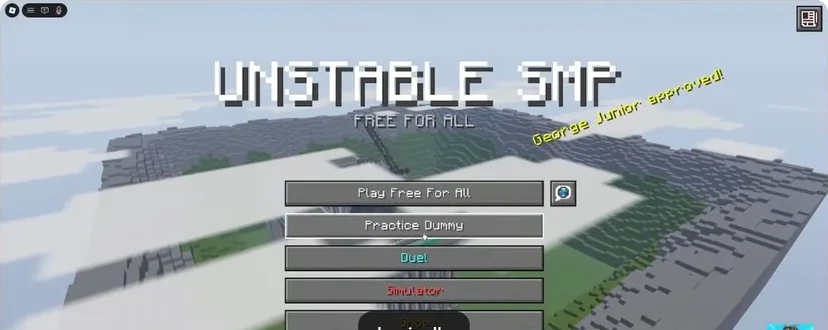
- FFA: enter an open player battle.
- Practice Dummy: learn the kit without a live opponent.
- Duels: focus on one opponent.
- Simulator: fight an army.
Press H to bring up the PC help overlay. Use the controls reference to find inventory, offhand and menu keys. On touch or controller, follow the prompts shown on your device; the keyboard table is for PC.
2. Read the kit before picking a favourite
Select a character and inspect the right-hand panel. The armour section and hotbar preview tell you what you are taking into the arena. Start with a kit whose main weapon you recognise. Change characters when you want to learn a specific tool, rather than after every lost fight.
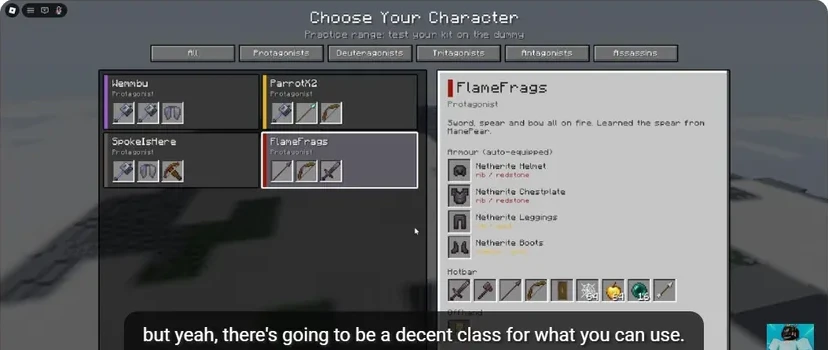
- The selected character determines the equipment preview.
- Armour appears separately from usable hotbar items.
- Locate the weapon, shield, cobweb, apple and pearl slots.
Identify four things: your main attack, your protection, your healing item and your way out. A pearl, a shield and an apple do different jobs. Practise selecting each, then returning to the weapon. Our inventory and offhand guide explains the relevant keys.
3. Land deliberate attacks
Stand close enough to hit the dummy, keep your crosshair on it, and let the sword attack indicator recover between swings. Hyunn demonstrates why repeated clicking loses the rhythm of the weapon. Add movement only after you can repeat the attack.
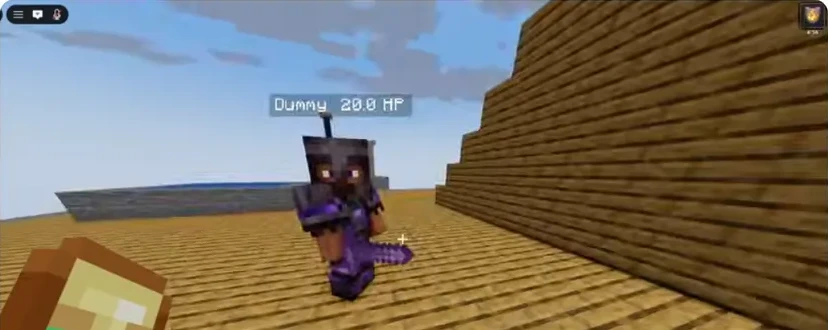
- Read the dummy health display as you repeat the same attack.
- Keep the crosshair on the target instead of watching your hands.
Next, practise a jump and a descending hit. Then try approaching, hitting once and stepping away. Follow the sword combat routine for critical hits, strafing and sprint resets.
4. Prepare before committing
Eat a golden apple before a planned engagement when your kit provides one. Use the available potions while you have room. Find your escape item before the fight starts, especially if you are carrying cobwebs or pearls. The healing guide covers the sequence.
5. Take one skill into Duels
Choose one goal for a duel: keep the crosshair on a moving target, land a descending hit, or escape after a failed approach. After the fight, return to the dummy for the step that broke down. Move into FFA when you can manage that sequence while watching for a second opponent.
Avoid this beginner trap: learning a new character, a new combo and a new movement tool in the same fight. Keep the kit fixed while learning the controls.
Sources
Checked 2026-11-13 · sources below
Game identity and mode limits: official Roblox experience. Screenshots link directly to the creator and the displayed video moment. Step sequences and practice drills are written by the wiki editors.
Related videos


Related Articles
guides
Character guide: read kits, compare Wraith and FlameFrags
Compare real Wraith and FlameFrags loadout panels in Unstable SMP FFA, then choose a character around the weapons and movement you want to learn.
guides
Cobweb guide: trap opponents and escape with pearls
See how cobwebs affect Unstable SMP FFA fights, where to place pressure and how to choose a clear Ender Pearl escape destination.
guides
Sword combat guide: critical hits, strafing and W-taps
Practise Unstable SMP FFA sword timing, descending critical hits, strafing and sprint resets with annotated dummy screenshots and video references.
Was this helpful?
Thanks for the feedback!