Game modes explained: Practice, Duels, FFA and Simulator
Compare all four Unstable SMP FFA modes with the real menu, a visual controls reference and a clear route from practice to player battles.
Choose the activity, then choose the kit
The main menu contains four separate routes. They serve different practice goals, so decide what you want to do before selecting a character.
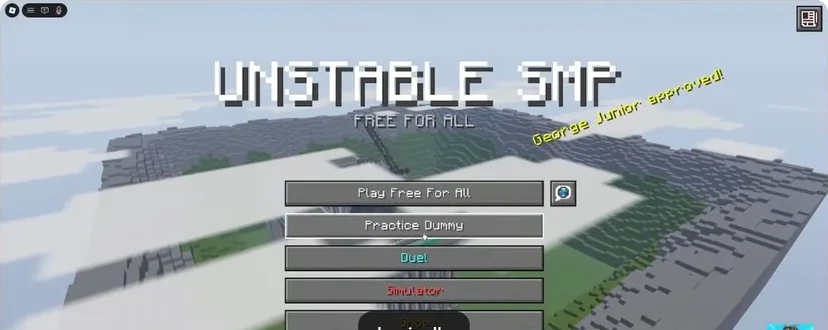
- FFA: enter an open player battle.
- Practice Dummy: learn the kit without a live opponent.
- Duels: focus on one opponent.
- Simulator: fight an army.
| Mode | Opponent | Best starting goal |
|---|---|---|
| Practice Dummy | Stationary dummy | Learn inputs and item changes |
| Duels | One player | Track a moving opponent |
| FFA | Other players in an open battle | Choose engagements and escape routes |
| Simulator | An army of soldiers | Manage sustained pressure alone or with a squad |
Practice Dummy: remove the distractions
Use the dummy when a movement sequence or item swap is new. Learn the sword rhythm, then add movement. It is also the place to rehearse the Elytra mace sequence before a player starts dodging.
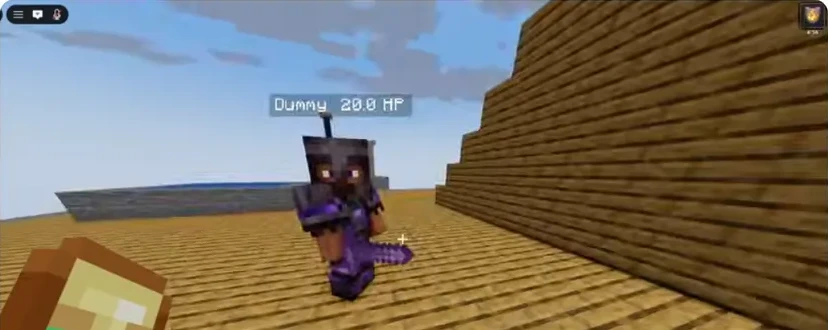
- Read the dummy health display as you repeat the same attack.
- Keep the crosshair on the target instead of watching your hands.
Duels: test one idea
A duel gives you one opponent to follow. Keep the kit fixed and focus on a single goal: strafing, descending attacks or a recovery sequence. The controls help lists Y to accept and N to decline a request.
FFA: read the space around the fight
In FFA, another player can enter an exchange already in progress. Look beyond the opponent in front of you. Keep an escape route in mind and avoid using every movement item just to start a fight.
Simulator: prepare for an army
The official description supports solo play or a squad of up to ten against up to 100 soldiers that fight back and heal. The Simulator guide explains the army selection screen and a simple way to practise under that pressure.
A useful progression
- Learn the kit and controls in Practice.
- Take the same kit into a duel.
- Try FFA when you can recover after an exchange.
- Use Simulator for army combat, with a clear target and regroup plan.
You can also go straight to the activity you enjoy. This progression is a learning route, not an unlock requirement.
Sources
Checked 2026-11-13 · sources below
Game identity and mode limits: official Roblox experience. Screenshots link directly to the creator and the displayed video moment. Step sequences and practice drills are written by the wiki editors.
Related videos

Related Articles
guides
Character guide: read kits, compare Wraith and FlameFrags
Compare real Wraith and FlameFrags loadout panels in Unstable SMP FFA, then choose a character around the weapons and movement you want to learn.
guides
Cobweb guide: trap opponents and escape with pearls
See how cobwebs affect Unstable SMP FFA fights, where to place pressure and how to choose a clear Ender Pearl escape destination.
guides
Sword combat guide: critical hits, strafing and W-taps
Practise Unstable SMP FFA sword timing, descending critical hits, strafing and sprint resets with annotated dummy screenshots and video references.
Was this helpful?
Thanks for the feedback!